Module 3: Documenting a full proposal
Learning objectives
|
This module includes review of the dataset deliverables assignment, provides a demonstration of working in the GBIF Grants Portal on a BID Full Proposal and includes two panel discussions with invited guests — volunteers from the GBIF community of practice. After completing this module, you should be able to perform the following:
|
Poll
| Using Mentimeter, answer the poll questions regarding the dataset deliverables assignment. You can view results, back on this page. |
Instructions
-
Go to the poll on Mentimeter
-
Reflect on the dataset deliverables assignment
-
Answer both poll questions
-
Return here to see the results
Understanding The Real Work of Biodiversity Data Mobilization
| During this panel discussion invited volunteers from the GBIF Community of Practice will share their views on the work that goes into a mobilization project, quality vs quantity, the people behind the data, and how to insure that mobilized data remains relevant over time. |
Example of a dataset deliverable
Click to expand
This example is largely based on a real dataset (DOI: 10.15468/viradl), but includes fictional elements to illustrate key concepts
Dataset Title
Solomon Islands Community Seagrass & Dugong Conservation Data (2018-2024)
Dataset Type
Sampling-events, survey, monitoring
Approximate # of Records
1500
Current Format of the data (i.e., undigitized, partially digitized, digitized)
Partially digitized (Data up to 2022 have been digitized, however, data collected in 2023 and 2024 are still in paper form in field notebooks).
Geographic Scope
Tetepare island (Western Province), Kmaga (Isable Province) and Marau (Guadalcanal Province)
Temporal Scope
15 January 2018 to 31 January 2024
Taxonomic Scope
Cymodocea rotundata, Cymodocea serulata, Enhalus acoroides, Halodule uninervis, Halophila Ovalis, Syringodium Isoetifolium, Thalassia hemprichii, Thalassoden Ciliatum, Zostera Capricorni
Sampling Methodology (if relevant)
Annual survey using 50 m fixed transect and standardized checklists to record seagrass and dugong occurrences and associated observations.
Relevance [why this dataset?]
The publication of this dataset will highlight the impact of community-based conservation efforts. It will also support Target 8 of the GBF by contributing to efforts to minimize the impact of climate change on biodiversity and build resilience, and promote the role of Locally Managed Marine Areas, a national priority identified in the Solomon Islands’ National Biodiversity Strategy and Action Plan (NBSAP). By publishing this dataset as a sampling event, it will enable the sharing of information on the relative abundance of species over time.
Data Holders
Solomon Islands Ministry of the Environment and Climate Change
Has the data holder confirmed agreement to publish the data through GBIF?
Yes
Expected Publication date
25 June 2026
Budget details
Click to expand

Slide 1: Title
In this short video, we will introduce some of the keys budget aspects, that we expect to see in a project full proposal, submitted under a BID managed call.
Slide 2: Full Proposal budget (1 of 2)
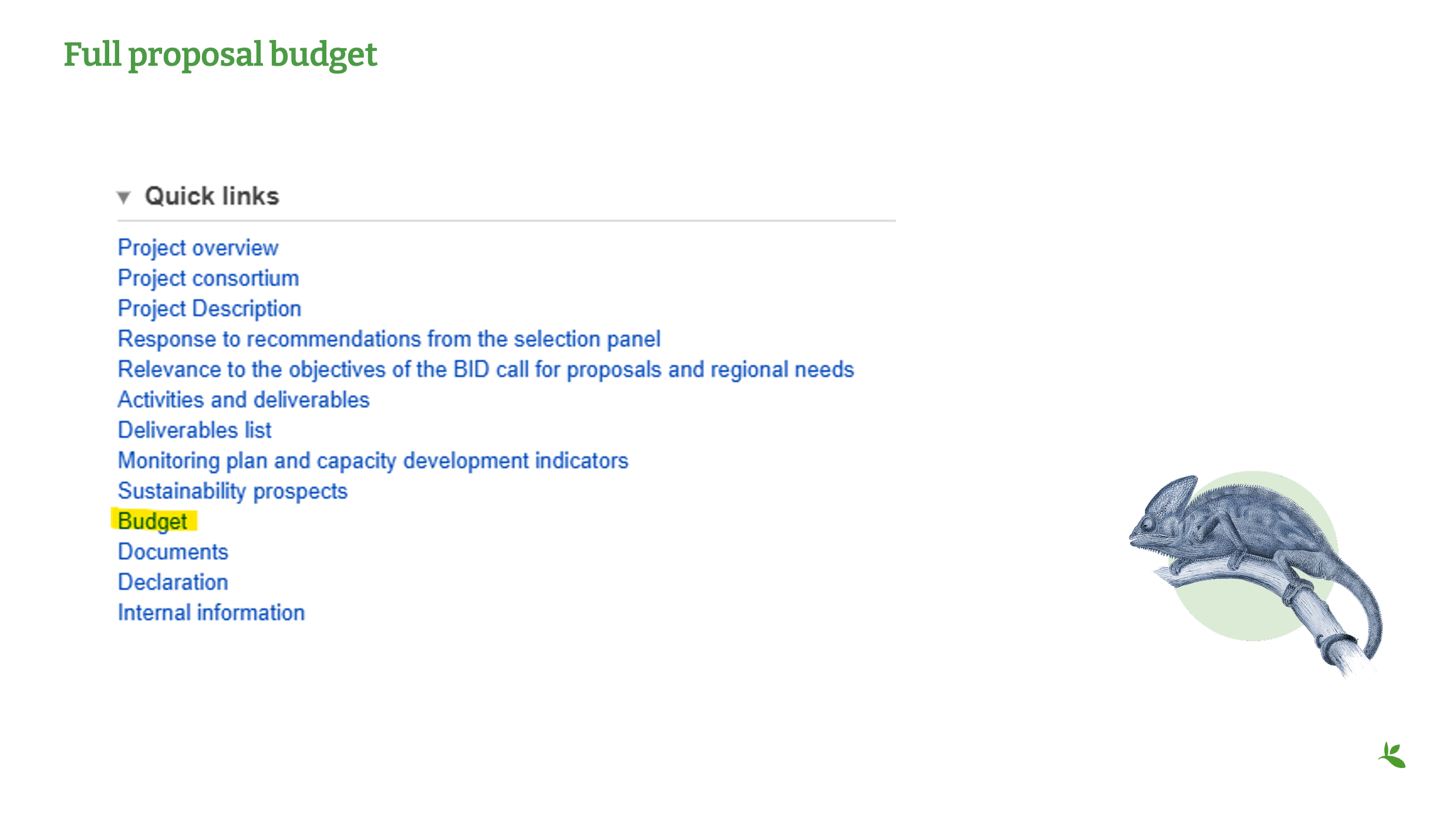
You can access the Budget section under Quick links as shown here.
Slide 3: Full proposal budget (2 of 2)
For the Concept Note, you were only required to indicate the total grant amount requested and the co-funding offered, along with a basic budget.
Now, for the Full Proposal, the budget needs to be more detailed.
As a first step, we recommend reviewing your list of identified activities and deliverables, and identifying all the costs associated with each one.
It is important that all cost estimates are accurately calculated and that the overall budget is realistic. Volume and price must be included for each of the planned expenses.
Please note that the quality of the budget will form part of the final assessment of your proposal.
Slide 4: Identify your local currency
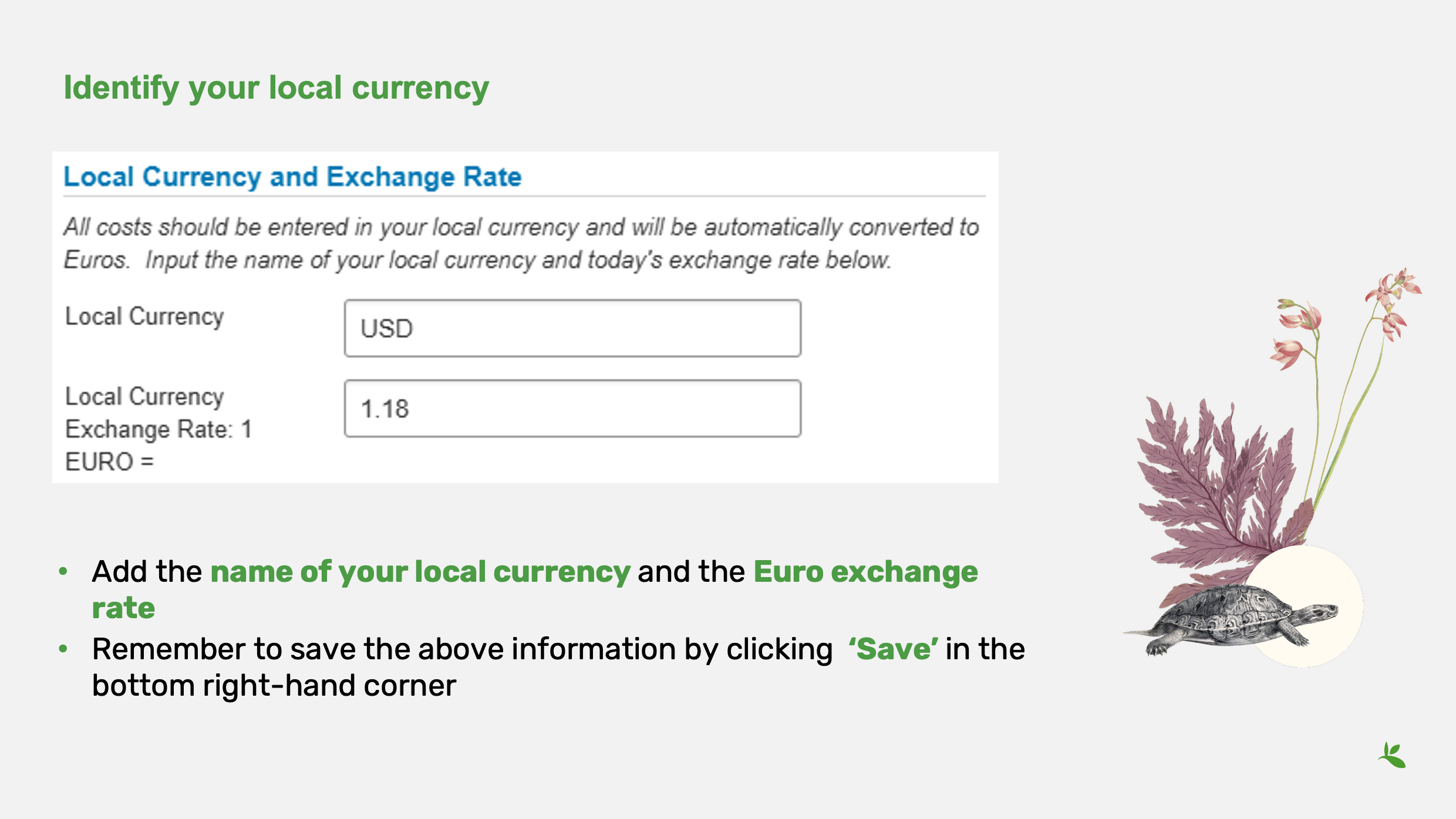
Next, you will be asked to identify your local currency and the Euro exchange rate.
Start by typing the name of your local currency. Then, indicate the exchange rate to the Euro—in other words, how much of your local currency equals 1 Euro.
For example, 1 Euro is equivalent to 1.18 US dollars.
We understand that exchange rates change daily. Please use the exchange rate that applies on the day you are completing the budget section.
Once you have entered this information, select Save in the bottom right-hand corner. This is a very important step. You will not be able to continue filling in the budget, unless you click Save first. When you do so, the system will automatically calculate the Euro exchange rate.
Slide 5: Detailed budget instructions
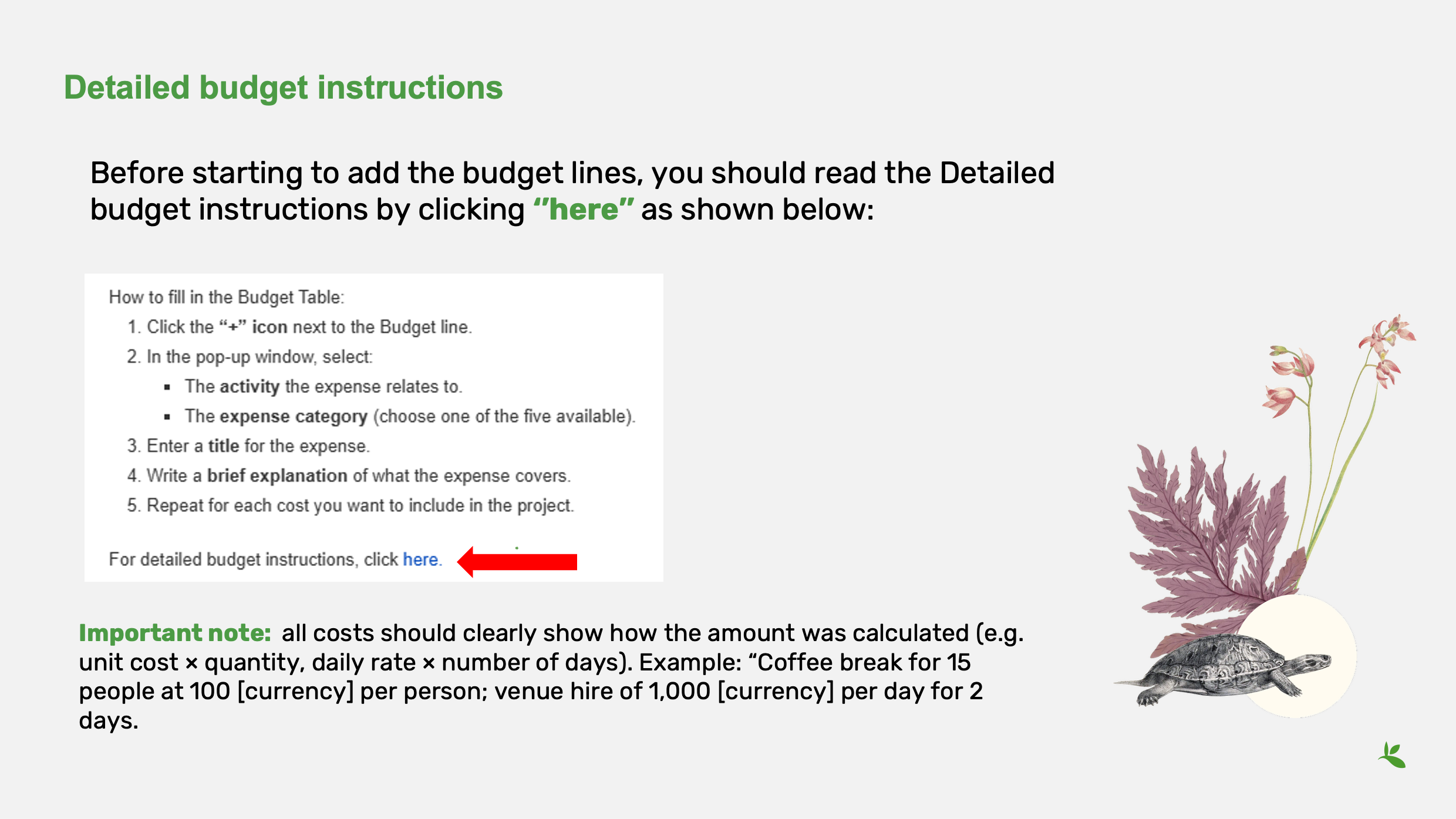
Before starting to add the budget lines, you can read the Detailed budget instructions by clicking on here. The detailed budget instructions give information on the expense categories, how the amounts should be calculated, what are ineligible costs and how to fill in the Budget table.
It is important to note here that all costs should clearly show how the amount was calculated (e.g. unit cost × quantity, daily rate × number of days).
Example: “Coffee break for 15 people at 100 [currency] per person; venue hire of 1,000 [currency] per day for 2 days.
Slide 6: Add budget lines (1 of 2)
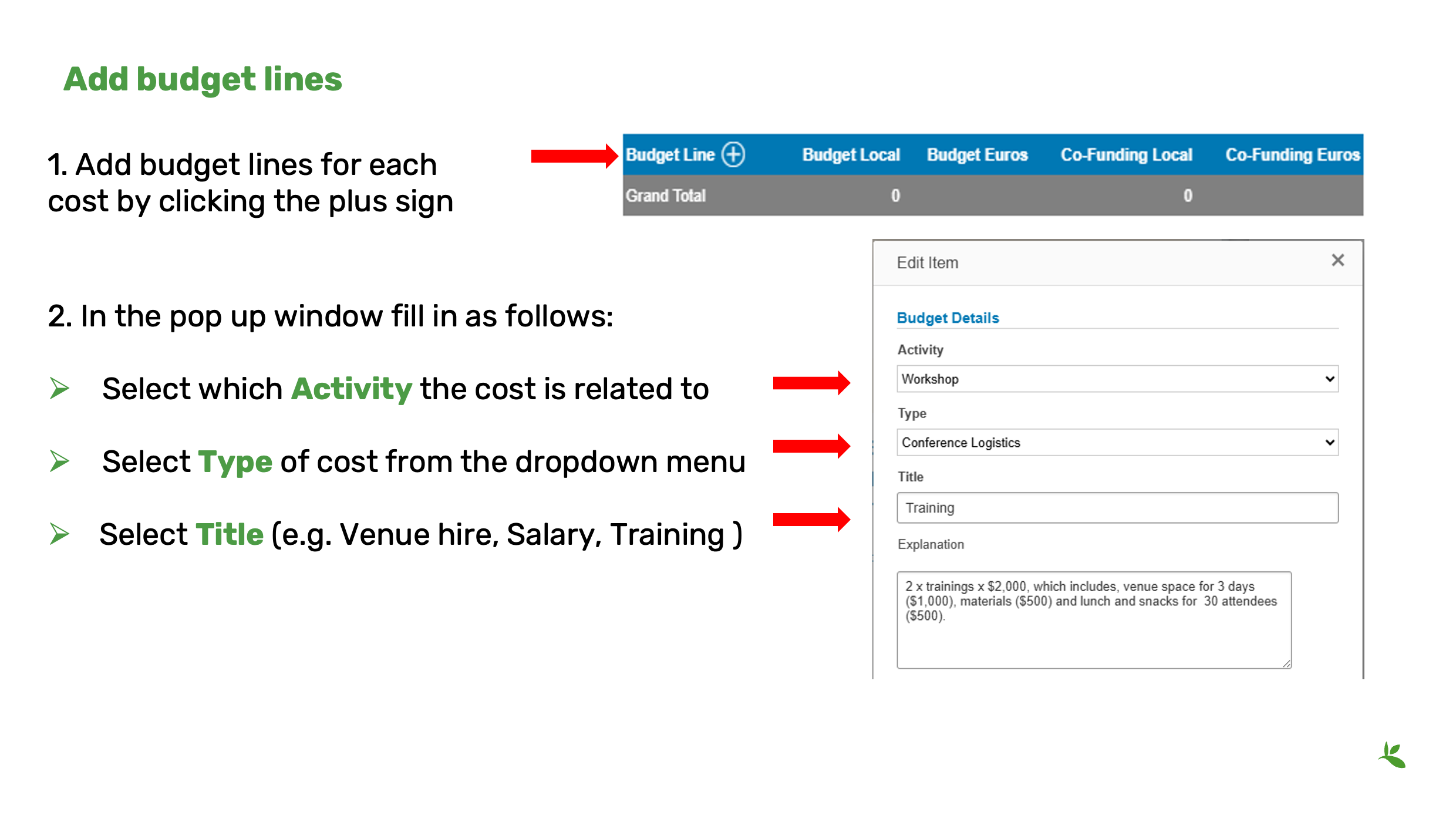
After you have indicated your currency and the Euro exchange rate and added the Detailed budget description, you can now add the budget information for each individual cost you have identified, based on the planned activities and deliverables.
To add the individual budget lines, click on the plus sign.
Once you have filled in the information for a budget line, click save.
Click on plus again to add a new budget line. You can add as many as you need.
If you wish to remove an entry, hover your mouse below the entry and click on delete (next to edit).
Save at the bottom of the page, to have the Euro amounts automatically calculated based on the Euro exchange rate you provided.
In the pop-up window, you need to select the Activity, Type and Title. Select the expense Type that is most appropriate for your cost.
The Title should make it easy to identify the specific cost. For example, if the expense Type is ‘Conference Logistics’ the Title might be ‘Venue hire’ or ‘Catering’.
Slide 7: Add budget lines (2 of 2)
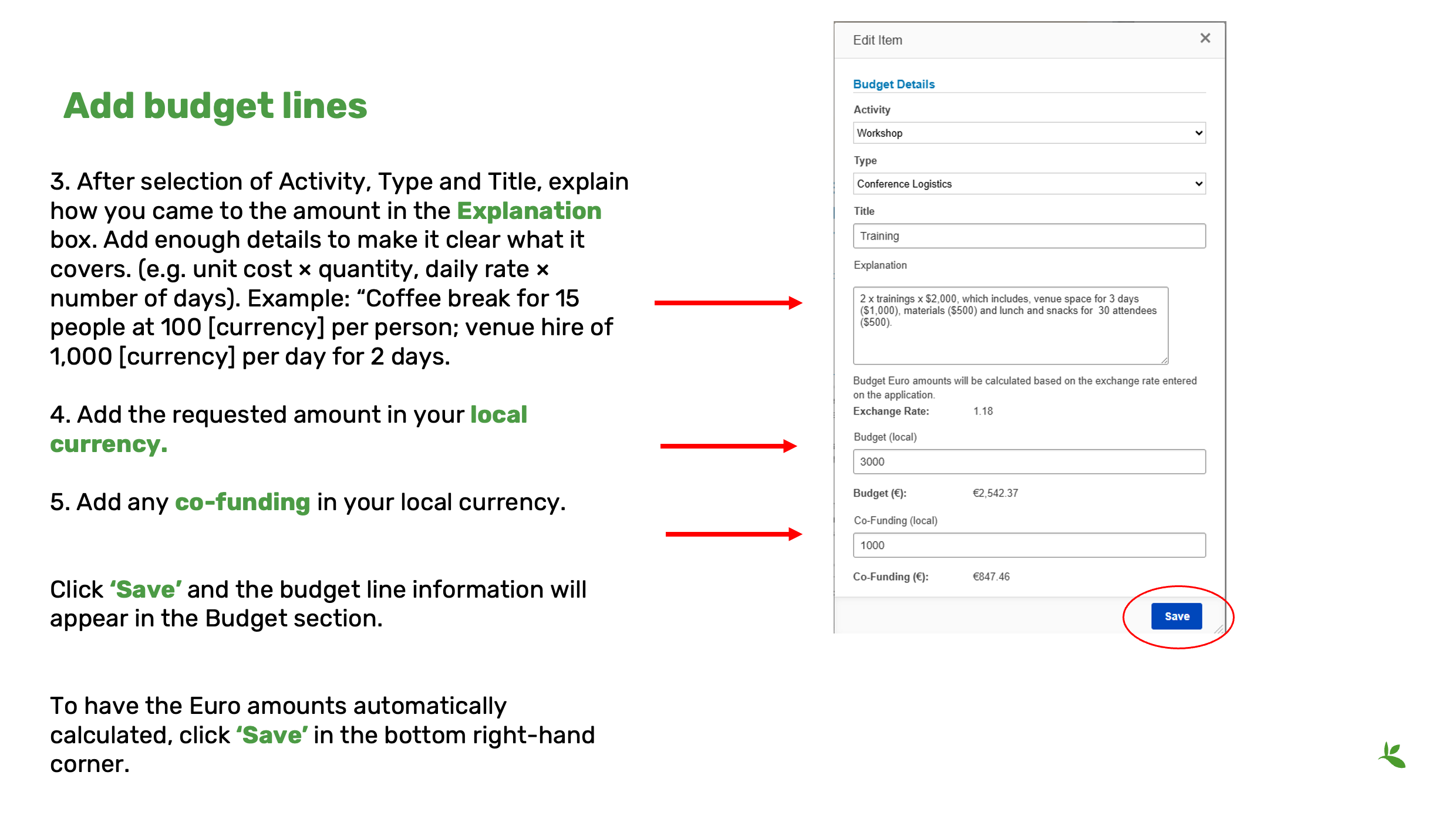
After you select the Activity, Type and Title you must explain how you came to the budget amount for each line. This would involve details such as unit price, hourly or monthly salary rates, accommodation costs per night, etc., depending on the type of cost.
If you added ‘Venue hire’ as the Expense title and selected ‘Conference Logistics’ as Expense Type, an example description could be:
“Hire of meeting room for 40 persons for 4 days. Daily rate is DKK 1,000”.
It is important that it is clear to us how you came to the amount, so make sure to supply enough details on what it covers.
Add the requested amount in your local currency.
If any co-funding is offered for this cost, please add the co-funding amount in your local currency.
After having completed this, remember to ‘Save’ your budget line.
The budget line information should now be visible in the budget section.
To see the Euro values for all information you have entered, please click ‘Save’ in the bottom right-hand corner of the screen. This will allow for the automatic calculation and will display the Euro amounts for all the costs you have added in your local currency.
Slide 8: Finalization of budget
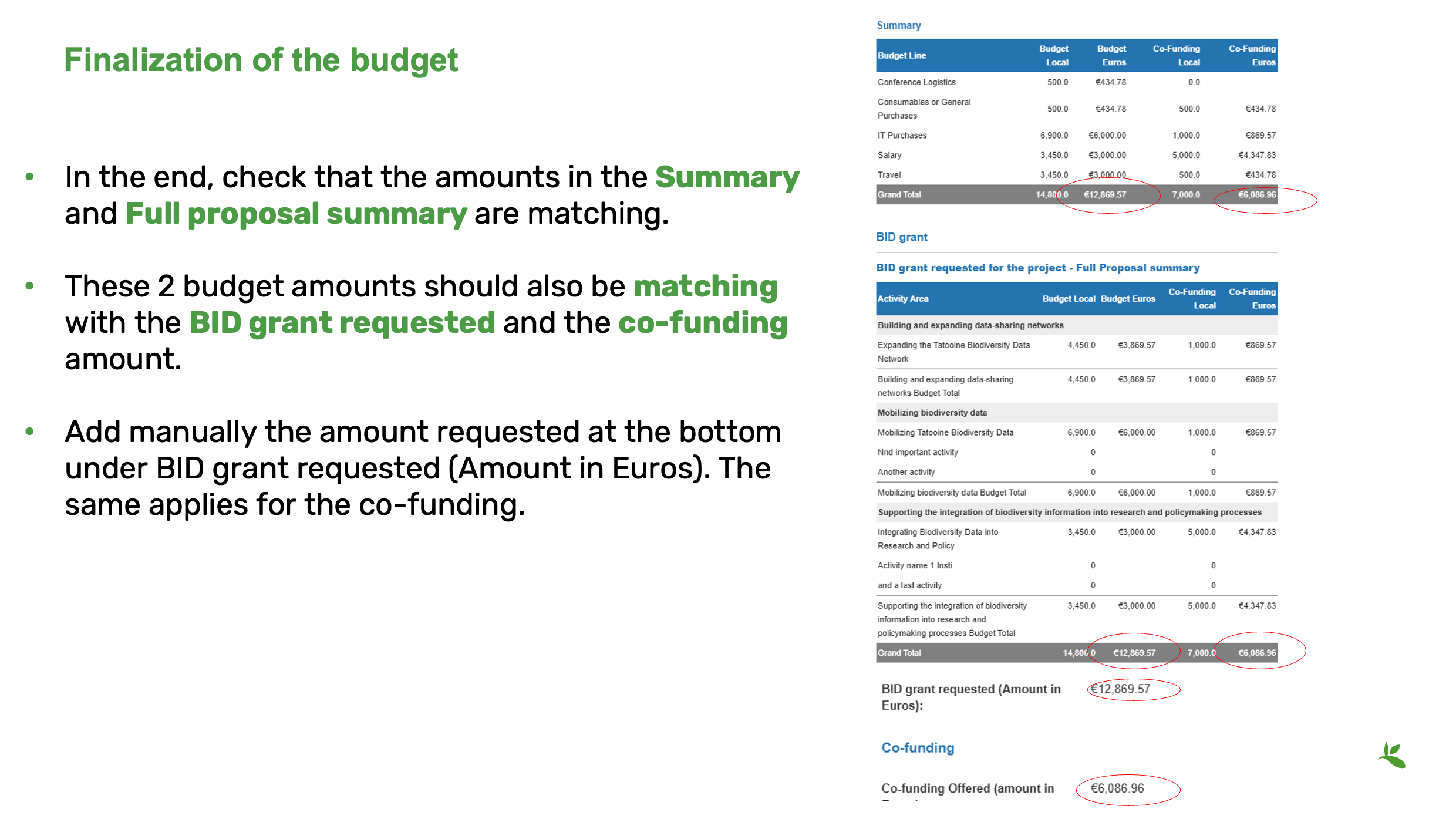
In the end, check that the amounts in the Summary and Full proposal summary are matching. These 2 budget amounts should also be matching with the BID grant requested and the co-funding amount.
Add manually the amount requested at the bottom under BID grant requested (Amount in Euros). The same applies for the co-funding.
Once you are done click Save and Close in the lower right corner.
Slide 9: Need help? If you need any assistance or encounter any technical or other issues, please don’t hesitate to reach out to us. You can contact the BID Coordination Team at BID@gbif.org.
Example of a full proposal
Download an example of a (fictional) full proposal (PDF 575 KB)
Taking a Reviewer Perspective to Strengthen Your Full Proposal
| During this panel discussion invited reviewers from the GBIF Community of Practice will share their views on key signs that a proposal will be relevant and impactful, what influences their decisions and feedback, considerations on efficient use of resources and cost-effectiveness of a project, and sustainability of a project. |